✓ Smart home technology is more accessible and affordable than ever for beginners.
✓ Starting small with a few key devices is the best approach for new users.
✓ Interoperability and ecosystem choice are crucial considerations for long-term smart home success.
✓ Smart home devices can enhance convenience, security, energy efficiency, and entertainment.
How It Works
1
Define Your Needs
Before buying, consider what problems you want to solve or what conveniences you desire. Do you want better security, automated lighting, or just to try out voice control?
2
Choose an Ecosystem
Decide on a central platform like Amazon Alexa, Google Home, or Apple HomeKit to ensure compatibility. This will simplify your setup and device management significantly.
3
Start with Foundational Devices
Begin with a smart speaker, smart lights, or smart plugs to get comfortable with the technology. These devices offer immediate benefits and are easy to install.
4
Expand and Automate
Once comfortable, gradually add more devices and explore automation routines. Link devices to work together, like lights turning on when you arrive home or adjusting based on time.
Demystifying Smart Home Technology for Newcomers
Photo: Anete Lusina / Pexels
Stepping into the world of smart home technology can feel like navigating a complex maze for the uninitiated. Jargon like 'Zigbee,' 'Z-Wave,' 'hub,' and 'ecosystem' can be intimidating, making many beginners hesitant to even start. However, the reality is far simpler and more user-friendly than it appears. Modern smart home devices are designed with ease of use in mind, offering intuitive setup processes and seamless integration, often guided by user-friendly apps. The fundamental concept behind a smart home is to connect various devices within your residence to the internet, allowing them to communicate with each other and be controlled remotely or automatically. This connectivity transforms ordinary appliances into intelligent tools that can respond to your voice, schedule, or even your presence. Imagine your lights turning on as you enter a room, your thermostat adjusting itself based on the weather forecast, or your coffee machine starting to brew just before your alarm goes off. These aren't futuristic fantasies; they are everyday realities made possible by smart home technology. For beginners, the key is to understand that you don't need to overhaul your entire home at once. A gradual approach, starting with a few key devices that address immediate needs or interests, is often the most successful strategy. This allows you to learn at your own pace, understand how different devices interact, and build confidence before expanding your smart home ecosystem. Furthermore, the market is flooded with devices specifically tailored for newcomers, offering straightforward installation and minimal technical know-how required. These 'plug-and-play' solutions are perfect for dipping your toes into the smart home pond without feeling overwhelmed. The benefits extend beyond mere convenience, encompassing enhanced security, significant energy savings, and even improved accessibility for individuals with specific needs. Our goal in this guide is to break down these complexities, explain the core concepts in plain language, and empower you to confidently embark on your smart home journey. We'll explore the essential components, recommended starter devices, and practical tips to ensure a smooth and enjoyable experience, making smart home automation accessible to everyone. Forget the technical jargon; let's focus on the practical advantages and how these devices can genuinely improve your daily life, making your home work smarter, not harder, for you.
Building Your Foundation: Essential Smart Home Devices for Beginners
Photo: Ron Lach / Pexels
When embarking on your smart home journey, choosing the right foundational devices is crucial. These are the entry points that will introduce you to the core functionalities of smart living without requiring a significant investment or complex setup. The most popular and recommended starting points typically fall into a few key categories: smart speakers, smart lighting, and smart plugs. A smart speaker, such as an Amazon Echo Dot or Google Nest Mini, often serves as the central hub for voice control. These devices allow you to issue commands, ask questions, play music, and most importantly, control other compatible smart devices with just your voice. They are excellent for getting accustomed to voice commands and understanding the potential of a connected home. Setup is usually as simple as plugging it in and connecting it to your Wi-Fi via a smartphone app. Smart lighting is another excellent starting point. Options like Philips Hue or affordable alternatives from brands like Wyze or TP-Link Kasa allow you to control your lights from your phone, schedule them to turn on/off, or even change colors. The immediate gratification of turning off all the lights from your bed or setting a 'wake-up' scene with gradually brightening lights is immense. Many smart bulbs connect directly to your Wi-Fi, eliminating the need for a separate hub, making them incredibly beginner-friendly. For traditional appliances, smart plugs are a game-changer. These small devices plug into any standard outlet, and then you plug your lamp, fan, or coffee maker into the smart plug. Suddenly, your 'dumb' devices become smart. You can turn them on or off remotely, set schedules, or integrate them into voice commands. This is a cost-effective way to automate existing items in your home without replacing them entirely. Beyond these core three, consider a smart thermostat like the ecobee Lite or Google Nest Thermostat E. While a slightly larger investment, they offer significant energy savings and enhanced comfort by learning your preferences and adjusting temperatures automatically. These devices often pay for themselves over time through reduced energy bills. The beauty of starting with these foundational devices is their simplicity and the clear benefits they offer. They provide a tangible experience of smart home convenience, allowing you to build confidence and understand what you truly value in a smart home before expanding. Remember, the goal is to enhance your living experience, not complicate it. By selecting a few key, easy-to-use devices, you lay a solid groundwork for a truly intelligent home.
Navigating Ecosystems and Ensuring Seamless Smart Home Setup
Photo: Anete Lusina / Pexels
One of the most critical decisions for smart home beginners, often overlooked, is choosing an ecosystem. This choice profoundly impacts the compatibility and overall user experience of your smart home. The three dominant ecosystems in the US market are Amazon Alexa (via Echo devices), Google Home (via Nest devices), and Apple HomeKit (primarily for iPhone users). Each offers a slightly different philosophy and range of compatible devices. Amazon Alexa boasts the widest range of device compatibility and a vast array of skills, making it a versatile choice. Google Home excels with its powerful AI and deep integration with Google services, providing intelligent responses and proactive assistance. Apple HomeKit prioritizes privacy and security, offering a streamlined experience for those already invested in the Apple ecosystem. While many devices claim 'Works with Alexa' or 'Works with Google Assistant,' true seamless integration comes from devices designed natively for a particular ecosystem or those that leverage common communication protocols like Wi-Fi, Bluetooth, Zigbee, or Z-Wave. For beginners, sticking primarily to devices within one major ecosystem for your initial purchases is highly recommended. This simplifies setup, centralizes control through a single app, and ensures devices can communicate and automate effectively. For example, if you start with an Amazon Echo speaker, prioritize smart lights and plugs that are 'Works with Alexa' certified. This minimizes potential compatibility headaches and makes troubleshooting much easier. The setup process for most modern smart home devices is surprisingly straightforward. Typically, it involves downloading the manufacturer's app, plugging in the device, and following on-screen instructions to connect it to your home Wi-Fi network. Many devices now feature QR code scanning for instant pairing, further simplifying the process. Once connected, you'll usually link the device to your chosen ecosystem's app (e.g., Alexa app, Google Home app) to enable voice control and integrate it into routines. Automation, often called 'routines' or 'scenes,' is where the real magic happens. This allows you to program devices to react to specific triggers. For instance, you could create a routine where saying 'Good Morning' turns on your bedroom lights, starts your smart coffee maker, and reads you the news. Or, a simple schedule could turn on your porch light at sunset and turn it off at sunrise. Experimenting with these automations is key to unlocking the full potential of your smart home and tailoring it to your lifestyle. Don't be afraid to try different combinations and adjust them as your needs evolve. The goal is to make your home more responsive and intuitive, enhancing your daily life rather than adding complexity. Remember, you can always expand your ecosystem later or use third-party apps like IFTTT ('If This Then That') to bridge compatibility gaps, but for a smooth start, focus on a unified approach. This ensures a pleasant and frustration-free smart home experience from day one.
Common Mistakes and Smart Tips for Your First Smart Home Devices
Photo: Anete Lusina / Pexels
Embarking on your smart home journey is exciting, but like any new endeavor, there are common pitfalls beginners can fall into. Avoiding these can save you time, money, and frustration, ensuring a smoother transition to smart living. Here are some key mistakes to avoid and practical tips to ensure success.
**Common Mistakes to Avoid:**
* **Buying Incompatible Devices:** One of the biggest mistakes is purchasing devices that don't work together or aren't compatible with your chosen ecosystem. Always check for 'Works with Alexa,' 'Works with Google Home,' or 'HomeKit compatible' labels before buying.
* **Overbuying Too Soon:** Don't try to automate your entire home overnight. Starting with too many devices can be overwhelming and lead to a confusing setup. Begin small and expand gradually.
* **Ignoring Your Wi-Fi Network:** A robust and stable Wi-Fi network is the backbone of any smart home. Weak signals or an outdated router can lead to connectivity issues and device unresponsiveness. Ensure your router can handle multiple connected devices.
* **Neglecting Security and Privacy:** Smart devices collect data. Always review privacy policies, use strong, unique passwords for all accounts, and enable two-factor authentication where available. Be mindful of where you place smart cameras or microphones.
* **Skipping the Setup Instructions:** While many devices are intuitive, a quick read of the instructions can prevent common errors and ensure optimal performance.
**Smart Tips for Success:**
* **Start with a Clear Purpose:** Before buying, ask yourself: 'What problem am I trying to solve?' or 'What convenience do I want?' This helps you choose devices that genuinely add value.
* **Choose One Ecosystem (Initially):** Stick to Amazon Alexa, Google Home, or Apple HomeKit for your first few devices. This simplifies management and enhances compatibility.
* **Prioritize Foundational Devices:** Smart speakers, smart plugs, and smart lights offer the most immediate and tangible benefits for beginners.
* **Learn to Create Routines/Automations:** The true power of a smart home lies in its ability to automate tasks. Experiment with simple routines (e.g., 'Good Morning' routine, 'Bedtime' routine) to see how devices can work together.
* **Test and Troubleshoot:** Don't be afraid to experiment. If something isn't working, check your Wi-Fi, reboot the device, or consult the manufacturer's support. Most issues are easily resolved.
* **Consider Voice Control:** While app control is great, voice commands significantly enhance the smart home experience. Get comfortable using your smart speaker for daily tasks.
* **Stay Informed:** The smart home market evolves rapidly. Keep an eye on new products and software updates that can improve your system.
By avoiding these common mistakes and implementing these smart tips, beginners can build a functional, secure, and genuinely helpful smart home that grows with their needs and understanding.
Comparison
Feature
Smart Speaker (Echo Dot)
Smart Plug (TP-Link Kasa)
Smart Bulb (Philips Hue White)
Smart Thermostat (Nest Thermostat E)
Initial Cost
$50
$15-$25
$15-$20
$129-$169
Ease of Setup
Very Easy
Very Easy
Easy
Moderate
Voice Control
✓
✓ (via compatible speaker)
✓ (via compatible speaker)
✓ (via compatible speaker)
Remote Control
✓
✓
✓
✓
Scheduling
✓ (alarms, timers)
✓
✓
✓
Energy Saving Potential
✗
Low
Low
High
Hub Required
✗ (built-in)
✗
✗ (for basic function), ✓ (for full features)
✗
What Readers Say
★★★★★
"As a complete tech novice, I was hesitant about smart home devices for beginners. But my new smart plug and Echo Dot were incredibly easy to set up and use. Now I can turn off my lamp with my voice from bed!"
Sarah J. · Austin, TX
★★★★★
"This guide helped me choose my first smart lights. The installation was a breeze, and I love being able to dim them from my phone. It truly simplified my evening routine."
Michael D. · Chicago, IL
★★★★★
"After reading about smart home devices for beginners, I invested in a smart thermostat. My energy bill has actually decreased by 15% in the first month, and I'm more comfortable than ever."
Emily R. · Seattle, WA
★★★★★
"While most devices were straightforward, integrating a few older smart devices with my new ecosystem took a little troubleshooting. Still, the convenience is undeniable once everything is connected."
David L. · Miami, FL
★★★★★
"I got a smart speaker just for music, but I quickly realized how useful it is for controlling other devices. It's fantastic for setting timers while cooking and getting quick weather updates too."
Jessica M. · Denver, CO
Frequently Asked Questions
What are the easiest smart home devices for beginners to start with?
For beginners, the easiest smart home devices to start with are smart plugs, smart bulbs (Wi-Fi enabled), and smart speakers (like Amazon Echo Dot or Google Nest Mini). These devices typically require minimal setup, connect directly to your home Wi-Fi, and offer immediate, tangible benefits such as voice control for appliances or remote light management, making them perfect entry points into smart home technology.
Do I need a central hub for all my smart home devices?
Not necessarily for beginners. Many modern smart home devices, especially smart plugs and Wi-Fi bulbs, can connect directly to your home's Wi-Fi network and be controlled via their own app or a smart speaker. While a dedicated hub (like a SmartThings hub or Philips Hue Bridge) can offer enhanced functionality, better reliability, and broader compatibility for advanced setups, it's not a mandatory starting point.
How do I set up my first smart home device?
Setting up your first smart home device usually involves three simple steps: 1) Plug in the device to a power source. 2) Download the manufacturer's official app on your smartphone. 3) Follow the in-app instructions to connect the device to your home Wi-Fi network and, if desired, link it to your chosen smart assistant (Alexa, Google Assistant, etc.). Most apps provide clear, step-by-step guidance.
Are smart home devices expensive to buy and maintain?
Smart home devices vary widely in price. You can start with basic devices like smart plugs or single smart bulbs for as little as $15-$25 each. More advanced devices like smart thermostats or security cameras can range from $100-$300+. Maintenance costs are generally low, primarily consisting of electricity usage (which is minimal) and occasional software updates, with no mandatory ongoing subscriptions for basic functionality.
What's the difference between Amazon Alexa, Google Home, and Apple HomeKit for smart homes?
These are the three main smart home ecosystems. Amazon Alexa and Google Home are the most widely compatible, offering broad device support and powerful voice assistants. Apple HomeKit prioritizes privacy and security, integrating seamlessly with Apple devices but typically supporting a more curated selection of devices. The best choice depends on your existing tech ecosystem and personal preferences for voice assistant and privacy.
Who should use smart home devices for beginners?
Anyone looking to add convenience, enhance security, save energy, or simply explore modern technology should consider smart home devices for beginners. They are particularly beneficial for busy individuals seeking automation, those wanting to improve home accessibility, or anyone curious about tech but unsure where to start due to perceived complexity or cost.
Are smart home devices secure? What about my privacy?
The security and privacy of smart home devices are valid concerns. Reputable brands employ encryption and regular software updates to protect against vulnerabilities. To enhance your security, always use strong, unique passwords, enable two-factor authentication, keep device firmware updated, and be mindful of camera and microphone placements. Reviewing privacy policies of device manufacturers is also recommended to understand data usage.
What are the future trends for smart home technology?
Future trends in smart home technology include greater interoperability across different brands and ecosystems (driven by standards like Matter), more advanced AI for personalized automation, enhanced energy management features, and increased integration with health and wellness monitoring. Expect devices to become even more intuitive, proactive, and seamlessly woven into daily life, anticipating needs rather than just reacting to commands.
Ready to transform your living space into a smarter, more efficient, and convenient home? Starting with smart home devices for beginners has never been easier. Take the first step today by choosing a foundational device and experience the future of home living.

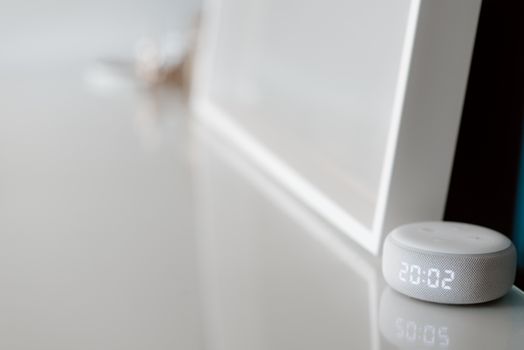 Photo: Anete Lusina / Pexels
 Photo: Ron Lach / Pexels
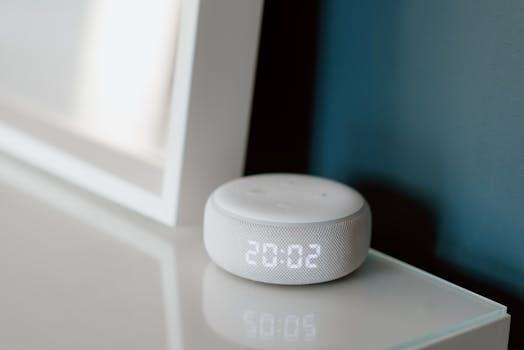 Photo: Anete Lusina / Pexels